
Eggstreme Farming Walk, place, unpack, skip time
There is no clean-pen hotkey — rent the matching yard, then press C.
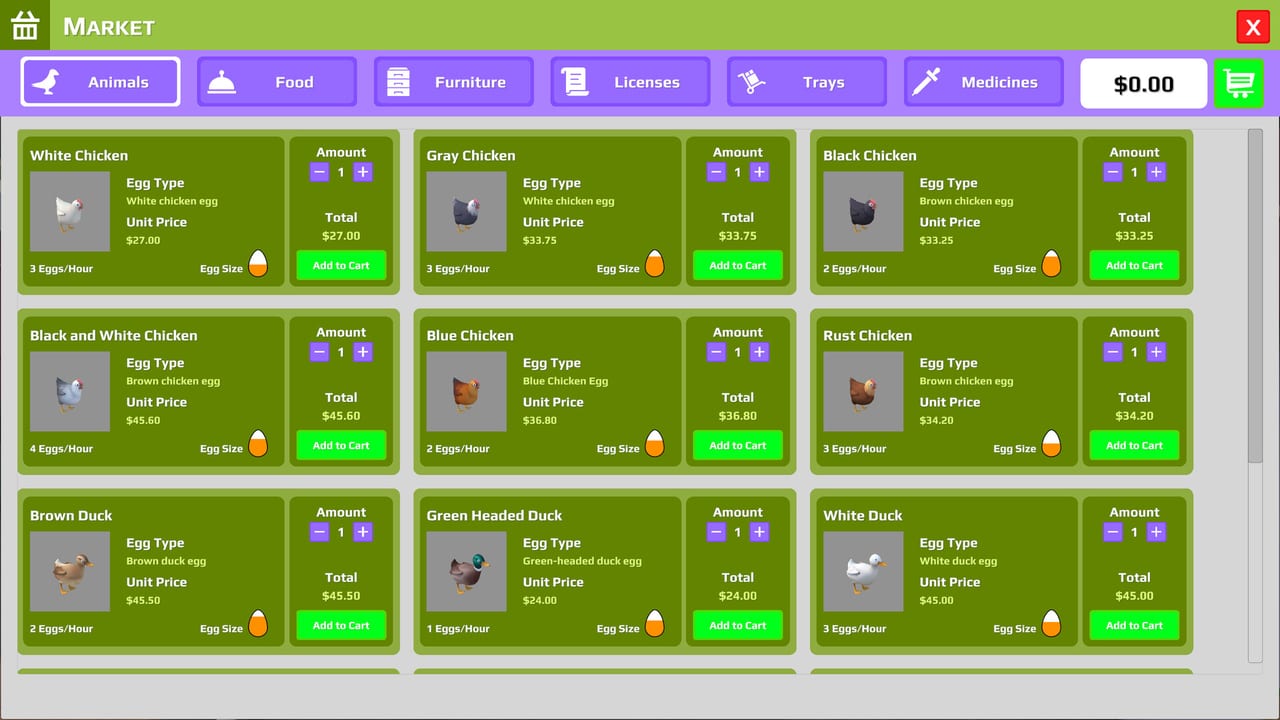
Eggstreme Farming is a first-person Steam sim. You walk the yard, pick up crates, and use a computer — you do not scrub a stall with a hidden hotkey. The most common Steam question is still “How to clean the pens???” and the answer is rental plus placement, not a mop. This page maps keyboard, mouse, controller, and the launch left-handed preset so you can seat a hen without restarting the day.
If you have not bought a license yet, stop and follow getting started first. Keys only matter after a crate is on the ground.
Movement and looking
Default layout is WASD plus mouse look. Walk the farmhouse, the yard, and the aisles between pens. Mouse-aim at interactables: the farm computer, food bins, water bins, delivery boxes, egg trays, the vending machine, and the bed. If nothing highlights, you are looking at the wrong side of a fence or standing in a pen you have not rented.
Interact, carry, and C to place
Official screenshots show C Place and G Throw on the HUD. Demo-era clips treat left click / interact as pickup and use, and C as place. Furniture placement also shows Confirm and Rotate. Treat C as “put this down in the world,” not as a clean command. Use G when you meant to toss a carried item rather than seat it.
Typical sequence:
- Buy the animal or tray on the computer (Market tab).
- Find the delivery box outside.
- Interact to unpack in open space.
- Walk the bird to the matching species pen.
- Press C when the green pen sign is in view.
Carry trays the same way. Eggs do not auto-sell. Pick eggs into a tray, carry it to the vending machine, and interact to sell. Launch lets you sell a partial tray and adds a six-egg tray. Timing those sales is covered in how to make money.
Do not hunt a “clean” bind. Species pens unlock when you rent them on Management. The chicken yard shows green text on the sign when the rental is active. Place the matching species there. Duck, goose, and turkey yards reject a chicken even if they look empty.
Unpacking boxes without breaking the hen
Community clips keep hitting the same crate traps:
- Unpack outside the fence. One demo-era clip showed a hen that refused to walk after being unpacked inside the box or the pen; restarting the day was the workaround at the time.
- Place only after the matching rental is paid.
- Furniture, shelves, and plants use the same unpack-then-place flow. They do not open extra pens. Use them when trays overflow, covered in farm expansion.
If a crate will not unpack, back up into the yard, look at the box again, and interact. Standing inside the pen or clipping the fence is the usual fail. Full-game machines such as the automatic water refill still arrive as delivery boxes — same unpack rules, different purpose.
Farm computer tabs
The indoor computer is not a pause menu. Market sells licenses, animals, trays, feed, medicine, furniture, and launch machines. Management rents pens. Bank offers small loans at steep interest (clips show about 12%). Music is optional and does not change production. Close the computer before you time-skip — Tab while the UI is open can feel sticky.
Tab time accel and the bed
Tab fast-forwards time. Launch allows time acceleration at any hour, not only at night. Use it after food and water are filled so you are not skipping into an empty bin.
A bed, added in demo 0.2.1, skips the night. Sleep if you want a clean morning rather than a long Tab hold. Animals were briefly bugged to stop laying after sleep; that was patched in the same demo update. The patch list lives on demo history.
Time skip does not pay bills. Utilities still tick. Check the bill warning (launch feature) before you hold Tab for a full day.
Controller and the left-handed preset
Steam Input is enabled. Players have seated hens with an Xbox-style pad, but the clean-pen confusion hits controller users harder because they hunt a face-button that does not exist. Map interact and place to two distinct buttons, then rent the species pen before you place.
Launch added a left-handed control preset. It remaps the same walk / look / interact / place / Tab cluster — it does not add a clean verb. Switch presets in settings before you buy a second crate if WASD fights your dominant hand. If the farm stutters on a handheld PC, confirm Windows specs on system requirements.
Stuck checklist
- Crate will not unpack: move outside, look at the box, interact again.
- Animal will not enter: rent the matching species pen (green sign), then place.
- Tray will not sell: wrong machine, or tray type does not match the eggs.
- Time will not skip: close the computer UI, then Tab.
Once placement is muscle memory, the rest of the game is economy and care — not a missing key. From here, animal care covers bins and medicine, and the guides hub lists the rest of the tutorials.
Frequently Asked Questions
Quick answers to the most common farm questions.
How do I clean the pens in Eggstreme Farming?
You do not. Rent the matching species pen on Management, unpack outside, and place the bird (C in clips). See this controls page and getting started.
What key places an animal or tray?
Demo-era clips use C to place after you unpack in open space. Interact/left click picks up and uses objects. Furniture in farm expansion uses the same place key.
Why won’t a delivery box unpack?
Stand outside the fence, look at the box, and interact. Unpacking inside the pen or crate was a documented clip bug. Machines in automation arrive the same way.
How do I skip the night?
Tab fast-forwards time (launch allows this at any hour). The bed added in demo 0.2.1 skips night — patch notes are on demo history.
Is there a left-handed preset?
Yes. Launch added a left-handed control preset that remaps walk, look, interact, place, and Tab. Details are in the launch notes.
Does a controller work?
Steam Input is enabled and players have used Xbox-style pads. Map interact and place separately; there is still no clean-pen button. Check system requirements if a handheld stutters.